
Everything VideoFlow.Studio does
From first inquiry to final invoice.
One platform for the jobs your studio actually does every day — leads, proposals, shoot scheduling, video review, time tracking, payments, and the numbers behind it all.


Leads & pipeline
Included in StudioNever lose a lead again
Give every inquiry a home. A shareable lead form drops new inquiries straight into your pipeline, and the board does the follow-up math for you.
- Branded public lead form — inquiries land in your pipeline automatically
- Drag-and-drop kanban from new inquiry to won or lost
- Stages update themselves as proposals are sent, viewed, and signed
- Lead reports show which channels turn into bookings


Proposals & e-sign
Included in StudioProposals that win the job
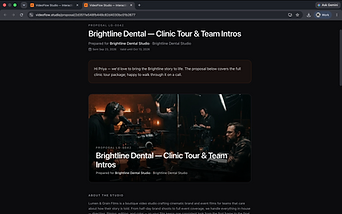
Send a polished, branded proposal with a single link — no attachments, no version chaos. Clients pick a package, sign online, and your pipeline updates itself.
- Branded shareable proposals with scope, terms, and a valid-until date
- Offer Bronze / Silver / Gold packages and let clients choose their tier
- Online acceptance with e-signature — Accepted or Declined flows back automatically
- Deposits as a flat fee or percentage, with expiry reminders built in


Shoot scheduling
Included in StarterShoot days, buttoned up
Plan every shoot day down to the minute, then hand the crew a call sheet they'll actually read — with the map, the weather, and everyone's call time on it.
- Run-of-show builder for each shoot day, with crew call times
- Assign crew with production roles, names, and phone numbers
- Weather forecasts appear automatically as the shoot approaches
- One-click branded PDF call sheets with maps, QR codes, and the day's schedule


Video review
Included in StudioReviews without the email chains
Upload a cut or embed from YouTube, Vimeo, or Dropbox — clients leave timestamped feedback right on the video, and every version lives in one place.
- Version history for every deliverable, from first cut to final
- Timestamped comments so feedback is never ambiguous
- Approve or request revisions without a single email thread
- Automatic nudges when a review sits idle too long


Transcription & captions
Included in StudioEvery cut comes with captions
Uploads are transcribed automatically, so clients get a seekable, timestamped transcript alongside the video — and reviewers can click a line of dialogue to jump straight to that moment.
- Auto transcription runs on every review upload — no setup
- Timestamped, clickable transcript synced to the player
- Highlight a transcript line to comment at that exact moment
- Voice memos from reviewers are transcribed too, so feedback is searchable


Cloud storage
Included in StudioYour cloud, your choice
Keep files where your workflow already lives. Each project can sit in your studio's Dropbox or your own Google Drive — switch per project without changing how anything else works.
- Every project gets its own organized folder, created for you
- Pick Dropbox or Google Drive per project — mix and match
- Stream review cuts straight from the cloud, no re-uploading
- Master files and deliverables stay in storage you control


Adobe Premiere integration
Included in ProReview notes inside Premiere
Editors never break their flow. A plugin panel inside Adobe Premiere pulls the latest versions and every client note, with each timestamped comment ready to mark on the timeline — and a one-click resolve when it's handled.
- See every deliverable version without leaving the edit
- Client timestamps and notes land right in the panel
- Mark notes on the timeline while you fix them
- Resolve notes in place — status syncs back to the portal


Time tracking
Included in StarterKnow where the hours go
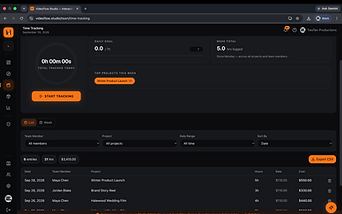
Log crew hours against projects in a simple weekly calendar, then see at a glance whether a production is on budget — in hours and in dollars.
- Weekly time calendar plus per-project entries
- Logged hours compared against your project estimates
- Crew hours convert to labor cost with your studio's rates
- Warnings before a project quietly runs over its hours

Workload planner
Included in StudioCapacity you can actually see
A weekly planner shows what every editor and crew member is booked into — tasks, shoots, and manual bookings stacked against real daily capacity, with conflicts flagged before you promise a delivery date.
- Weekly stacked bars of each member's booked hours vs capacity
- Per-member daily capacity, lunch breaks excluded automatically
- Time off lives in the same grid, so capacity stays honest
- Conflict and over-capacity scans warn you before the week goes sideways


Invoicing & payments
Included in StudioGet paid faster
Turn project line items into a branded invoice, email it with a payment link, and watch the status flip to Paid — without touching a spreadsheet.
- Branded PDF invoices generated straight from project line items
- Clients pay online through your own Stripe account
- Sync to QuickBooks or export CSV for any accounting tool
- Due-soon and overdue reminders go out automatically

Reports & KPIs
Included in ProProfit, not guesswork
See the real margin on every production — revenue minus expenses and labor — plus the lead funnel and team capacity numbers that run your studio.
- True profitability per project: revenue minus expenses and labor
- Lead funnel and channel reports show what's actually working
- Team capacity alerts flag over-loaded crew before burnout
- Exportable P&L summaries for partners and stakeholders


Client portal
Included in StudioA portal clients actually use
Clients get a clean, dedicated view of their projects — progress, deadlines, files, videos, and messages — and never see anyone else's data.
- Clients see only their own projects, invoices, and videos
- Progress, deliverable dates, and files in one simple place
- Review cuts and sign proposals without ever touching your team's tools
- Role-based access with linked client accounts

See it with your own projects.
Start your free trial — every feature above is included on the plan that fits your studio. Compare Starter, Studio, and Pro on the pricing section of our homepage.